Thursday, July 1, 2010

Error loading form in IE6 - "An Error has occured. Try this action again" / "An Error has happened getting the date"

Recently I noticed an issue with viewing some forms using Internet Explorer 6. Here's the senario:

You try to open an entity with a large number of attributes (often multiple date fields). But the form partially loads with the note in the status bar "X items remaining".
At this point IE is not responfing and the only option is to wait or End Task in the Task Manager.

After a long wait, the form finally loads. But with Errors:

You may also get various other errors.
Solution:

This error is probably related to the maximum number of concurrent TCP connections that Internet Explorer 6 can open. By default IE 6 only allows maximum of two TCP connections. If the browser tries to open a third, it freezes and waits for another connection to become available. This is particularly seen on a web page with several http AJAX type calls to the server. Various CRM 4.0 components such as the date/time field use AJAX to retrieve data.
This problem has been resolved in IE 8.0 onwards. But you can increase the TCP connections in a browse using a registry setting that’s often used to improve and speed up IE’s performance.

Open RegeditNavigate to [HKEY_CURRRENT_USER\Software\Microsoft\Windows\CurrentVersion\Internet Settings]

Add a new DWORD
MaxConnectionsPer1_0Server
Enter a decimal value for the new Key of at least 8

Add another new DWORD
MaxConnectionsPerServer
Enter a decimal value for the new Key of at least 8


More details on setting this registry key: http://www.windowsreference.com/internet-explorer/speed-up-internet-explorer-by-tweaking-maximum-connections/

Error Importing Organization in CRM 4.0:

Error: Import Organization (Name=, Id=) failed with Exception:System.Data.SqlClient.SqlException: The transaction log for database 'XXXX_MSCRM' is full. To find out why space in the log cannot be reused, see the log_reuse_wait_desc column in sys.databases

This error suggestes that the database transaction log has grown beyond maximum size or disk is full. The odds are that you have a fairly large database reaching a few GB. There are 2 possible solutions here...

Solutions 1
Since importing an Organization in CRM 4.0 will involve a lot of work, the transaction log occasionally tends to become unmanageably large. First try to lower the log size.

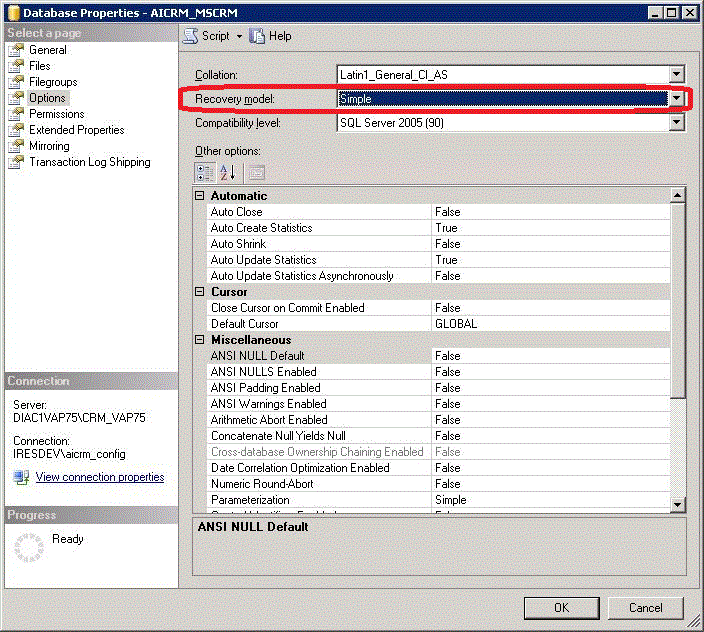
In the database properties screen set "Recovery Mode" to simple:

Now remember to change this setting back to "Full". This is only dependant on your system's recovery strategy.

If you don't have at least Update Rollup 8 installed then it may be time to do so now. This provides a new and improved Organization Import functionality as described here (http://support.microsoft.com/kb/977867). Remember that you would still need to add and set the new registry key "OptimizeOrgImport" manually.

Monday, December 14, 2009

Still experiencing "Transaction was deadlocked on lock resources with another process"?

I recently posted and article about the following error:
Exception: System.Data.SqlClient.SqlException: Transaction (Process ID XX) was deadlocked on lock resources with
another process and has been chosen as the deadlock victim. Rerun the transaction.
See http://kiavashshakibaee.blogspot.com/2009_07_01_archive.html
I've recently found that in addition to the original solution, there are occasions when a deadlock cannot be avoided.

In my case, after running a trace log, I found the error to be reported on a sql "Select" statement. Your plugin is probably attempting to read a record while CRM or another plugin has it locked.

The solution to this issue is to enable "Read Committed Snapshot Isolation (RCSI)". Enabling RCSI causes SQL to maintain a snapshot of the database against which read operations are executed, writes and updates are still performed against the actual database, this means that write operations no longer block read operations. (see http://blogs.msdn.com/craigfr/archive/2007/04/25/read-committed-isolation-level.aspx for more)

To enable RSCI, ensure you have exclusive connection to the CRM Database and run the following SQL script:

ALTER DATABASE (CRM Organization)_MSCRM
SET
READ_COMMITTED_SNAPSHOT ON
go
SET TRANSACTION ISOLATION LEVEL SNAPSHOT
go

Thursday, July 2, 2009

Transaction (Process ID XX) was deadlocked on lock resources with another process and has been chosen as the deadlock victim

Asynchronous Plugin Error: "System.Web.Services.Protocols.SoapException: Server was unable to process request. ---> System.Reflection.TargetInvocationException: Exception has been thrown by the target of an invocation. ---> System.Data.SqlClient.SqlException: Transaction (Process ID XX) was deadlocked on lock resources with another process and has been chosen as the deadlock victim. Rerun the transaction."

This error will be reported using the CRM Trace Diag Tool. To simplify the analysis of the trace log, you can use Stunware's CRM Trace Log Viewer.

This error signifies that there are two plugins or two instances of a plugin trying to write to the same entity. It seems that the Microsoft Dynamics CRM Asynchronous Service does not handle threading and deadlocks too well internally.

As I understand, the CRM Asynchronous Service often collects a load of jobs and executes them all together. The problem is that one plugin may lock the entire SQL table while writing to one record. During this process's very short writing time, the service also executes a bunch of other plugins. So we're going to experience a deadlock in the event that another plugin needs to write to the same entity.

How do we get around it? Use the Lock call to synchronise all asynchronous plugins. This will ensure that only one update is sent to the database at a time.

public class SalesOrderDetailPreCreate : SalesOrderDetail, IPlugin
{
static Object thisLock = new Object();

public void Execute(IPluginExecutionContext context)
{
lock (thisLock)
{
//
// Do your stuff and entity update here
//...
}
}
}

As far as I understand, it is a good idea to use this code on any asynchronous plugin as in a multi user environment, there is fair chance of a clash at some time.

Sunday, April 19, 2009

New Dynamics CRM 4.0 Demo VPC Image Released for Download - 17-Apr-2009

The new Dynamics CRM 4.0 demo virtual image has been released for download 17-Apr-2009.

https://mbs.microsoft.com/partnersource/deployment/methodology/vpc/MSD_CRM4VPCApril09 (Available to MS partners only)

Similar to previous versions, this in a CRM 4.0 image is on a Window Server 2003 with office, Sharepoint, OCS, Outlook, SQL Server, Reporting Services... Primarily, this is intended to demonstrate the power of CRM to prospective clients. Though many developers use this image as a basis for a development environment.

If you are in sales, then you will be happy to know that the new image is now pre-loaded with some additional accelerators and packed with many demo tools.

As a developer you should probably give a satisfied nod to the fact that there are SDKs and developer tools such as Visual Studio 2008 pre-installed.

My only issue is that due to the accelerators, this is no longer a clean install or a clean base image that I can use for customisaion of a new project. I guess its time to create my own Dev image and stop freeloading.

Thursday, April 9, 2009

Microsoft Dynamics CRM Developer Toolkit

The Microsoft Dynamics CRM Developer Toolkit has just been release but the CRM E2 team.

this tool is a major step forward to provide developers with the ability to work with CRM customizations from within the Visual Studio development environment.

As release by the Microsoft Dynamics CRM Product Team:


The MS CRM E2 team is pleased to announce the release of the Microsoft Dynamics CRM Developer Toolkit, which is available for download from the MSDN Code Gallery at http://code.msdn.microsoft.com/E2DevTkt

The Toolkit has been designed to make it easier for developers to customize, extend, and maintain an on-premise CRM solution, all from within an integrated Visual Studio environment. Key developer benefits include the ability to:
  • View All CRM Entities - Displays a listing of CRM entities that are dynamically available from the CRM Explorer within Visual Studio 2008
  • Create and Update CRM Entities - Allows for creating new entities and updating existing entities from within the CRM Explorer experience
  • Create a Wrapper Class - Provides the ability to auto-generate wrapper classes for entities, which exposes the CRM entities and their corresponding attributes as classes and properties respectively to enable development of code to interact with the entities
  • Generate Plug-in Code - Enumerates the available Plug-ins for an entity and generates the code necessary to jumpstart the plug-in development process
  • Integrate the Build and Deploy Process - Simplifies the process of building and deploying a CRM solution
  • Deploy Across Multiple Servers - Assists in deployment and maintenance of Windows installer packages across multiple environments


Find more information on this toolkit here.

See Jim Wang's technical blog [MVP] for quick installation instructions.

Thursday, March 19, 2009

LINQ to CRM

LINQ to CRM is one of Microsoft’s latest additions to the .Net 3.5 Framework Library. This library provides a uniform method of access to different types of entities, through a query language very similar to SQL. To learn more, see MSDN’s reference to LINQ to Entities and TechTarget’s LINQ Learning Guide.

I’m very excited to talk about the new LINQ to CRM libraries available recently. Say you need to retrieve an Account Number, given the Account Name…

Using the traditional webservice methods:
ColumnSet cols = new ColumnSet();
cols.AddColumns(new string[] {"accountnumber"});

QueryByAttribute
query = new QueryByAttribute();
query.ColumnSet = cols;
query.EntityName = "account";
query.Attributes = new string[] {"name"};
query.Values = new string[] {"Microsoft Dynamics CRM"};

RetrieveMultipleRequest req = new RetrieveMultipleRequest();
req.Query = query;
req.ReturnDynamicEntities = true;

RetrieveMultipleResponse resp = oService.Execute(req) as RetrieveMultipleResponse;
BusinessEntityCollection becMultipleRecords = resp.BusinessEntityCollection;
if (deSalesOrder.Properties.Contains("accountnumber"))
{
//And So On
//And So Forth
}


Using LINQ to SQL:
var accounts = (from a in context.Accounts
where a.Name.Equals("Microsoft Dynamics CRM")
select a).ToList();
LINQ2CRM.Account acc = (Account)accounts.First();
Response.Write("Account name = " + acc.Name.ToString());

The choice seems obvious to me, but I’ll try to contain myself. Though the available LINQ to CRM libraries already address select and update of data, there are still shortfalls. Functionality such as Assign and Set Status are still not available and need to be performed via the traditional methods. But judging by progress so far, I’m sure it won’t be long.

LINQ to CRM on CodePlex is a (Beta) community library available free for download and evaluation. I’m always a supporter of free and community based software, so I highly recommend support of this project. Ofcourse being in Beta, this is work in progress and I would not recommend use of this assembly commercially.

XrmLinq is a commercially available package. This is a much more complete and stable library. Installation and use is remarkably simple and functionally fairly complete. License fee is based on per deployment which makes it a little more costly than I would prefer but is available for free to CRM providers for development purposes. A subset of this library and source code is available on CodePlex for any curioustechies.

Tuesday, March 17, 2009

Microsoft Dynamics CRM 4.0 Rollup 3

Download Dynamics CRM 4.0 Rollup 3 here: http://www.microsoft.com/downloads/details.aspx?displaylang=en&FamilyID=05453fa4-9551-4a88-9852-634a9ad0e140

this rollup was released last week for CRM 4.0. And I would personally highly recommend it. Countless issues have been addressed up until this point. I've found that numerous behavior which I had even believed was by design has been corrected, simplifying plug-in development and customisations.

Friday, March 6, 2009

Dubugging Javascript in CRM Forms is Easy

Its easy to debug custom JavaScript in CRM forms. Save your JS code in the appropriate event and follow the instruction below. Debugging can be performed in IE or Visual Studio.

Scripting Debugging in Internet Explorer

entering the word "debugger" anywhere in your JS code will prompt IE to break at that point and load the script debugger.

Internet Explorer 8's New Developer Toolbar

If you've ever played around with Firefox's add-ons "Firebug", "Web Developer" and so on, you'd notice that there are capabilities that would take your CRM development to another level. It would be fantastic to have the ability to break down the DOM, CSS and test changes on the spot . Unfortunately Firefox is not compatible with Microsoft Dynamics CRM.

The latest release of Internet Explorer (IE8 RC1) contains the most useful tool as far as CRM development is concerned. The new Developer Toolbar holds a set of tools primarily targeted for developers in order to break down the DOM and list all elements of a web page.

Read more about the IE8 Developer Tools here.

How often have you tried to change the colour, font, visibility... of a control on the page? After a arduous task of finding the right tag, you then get to the job of making changes on your event code, save, publish, did not work right, try again...

The IE8 Developer Toolbar removes the hassle by displaying all page tags on a tree hierarchy and allowing live modifications to the page. The one shortfall that I've noted is that there is no facility to search a large page for a specific tag. Let's hope this is addressed in the next version.

Sunday, February 8, 2009

Reference External Javascript File in CRM Form Events Asynchronously

A few months ago I posted a method of importing external javascript files into CRM forms. See 'Reference External Javascript File in CRM Form Events'.

Some of you may have noticed an issue with this method when including multiple exeternal files. This is due to the fact that the process runs asynchronously while the rest of the code continues to execute.

A friend of mine Sam Manins managed to come up with a full work around for this. Thanks to Sam, the function below can be pasted into your OnLoad event for a more reliable method to import Javascript files into your CRM forms.

The idea is to invoke the command to add your external file, then wait for confirmation that the file was imported. Only then should we allow the code to continue. See comments within the code.

//Paste this function somewhere into your form "OnLoad" event
function includeExternalJSFiles(sec)
{
var errFound = 0;
// load the Ascentium js file into a Script element - do not do this on recursive calls to this function
if (sec == 1)
{
//Include the CRM js file
var Ascentium_Script = document.createElement("script");
Ascentium_Script.language = "javascript";
Ascentium_Script.src = "MyJSFunctions1.js"
document.getElementsByTagName("head")[0].appendChild(Ascentium_Script);
//Include another js file
var Ascentium_Script = document.createElement("script");
Ascentium_Script.language = "javascript";
Ascentium_Script.src = "MyJSFunctions2.js"
document.getElementsByTagName("head")[0].appendChild(Ascentium_Script);
//Add any more JS files you need
}
try
{
//Each file needs to have a simple function(with a unique name) that does nothing that can be called.
//th
en you can call this finction to see if the file has been imported yet.
MyJSFunction1_STUB();//this function is contained in the external JS file
MyJSFunction2_STUB();//this function is contained in the external JS file
}
catch(err)
{
//error found(probably could not find the function
errFound = 1;
}
if (sec < 5 && errFound == 1)
{
sec++;
setTimeout("includeExternalJSFiles(" + sec + ")", 100); //waits 0.1 second before trying the stubs again.
}
else
{
if (errFound == 1)
//Did not work after 5 attempts (0.5 seconds)
//Try a longer time period or output an error message for the user
//alert("Did not work: " + sec);
else
//All functions were found (all files imported)
//No need to do anything. Just exit functions and continue code
//alert("Success after " + sec + " attempts. ");
}
}

Remember to have a unique stub function to run in each external file. the function needs no do anything. Just needs to be there(See sample below).

//this function would be found in the file MyJSFunction1.js
function MyJSFunction1_STUB()
{
//stub function (does nothing)
var a;
}

Finally you need to call the function to import your Javascript files:

includeExternalJSFiles(0);

The above example makes the call to add the files to the page header, then continues to try to run a functions in each file every 0.1 seconds until successful or until 5 failed attempts. Different systems under different workloads may perform the job at different speeds. Feel free to modify the code to suit your needs.

And improvement on this function could be to also pass in the name of each Javascript file in an array, making it more generic.

A big thank you goes to Sam Manins for the solution.

Tuesday, January 27, 2009

Dynamics CRM Usergroup Sydney Returns!

The Sydney CRM usergroup was reopened last night(Microsoft building, North Ryde). Organised by Catherine Eibner and Guy Riddle, the event will be held every 4th Tuesday of every month.

This has been a long anticipated step forward for the Sydney CRM users and consultants and a great place to meet people in your field of business.

This month's discussions were over the newly release CRM Accelerators (presented by Guy), with detailed discussions on Notifications, eService and Events Management. The remaining Accelerators will be discussed next month.

Visit www.mscrm.com.au for more information and upcoming meeting event dates.

Tuesday, January 20, 2009

No need to retrieve entity in order to update attribute values

Scenario:
We have an existing account with a known GUID and would like to update their phone number.
Solution:

Common sense and traditional logic would often suggest to first open the specific account record, make modifications to all specific attributes, followed by update and close the entity:
ColumnSet cols = new ColumnSet();
cols.AddColumn("telephone1");
account myAccount = new account();
myAccount = oService.Retrieve(EntityName.account.ToString(), myAccountID, cols) as myAccount;
myAccount.telephone1 = "02 1234 1234";
oService.Update(myAccount);
The above code, though it works, contains a number of entirely unnecessary steps. For a far more efficient code block, see the following with an identical outcome:
account myAccount = new account();
myAccount.accountid = myAccountID;
myAccount.telephone1 = "02 1234 1234";
oService.Update(myAccount);
Note that there is no need to retrieve the targeted record before making modifications. As long as we set the entity ID to an existing GUID, the CRM SDK will take care of the rest. The stored value in the "telephone1" attribute will be replaced with the new value for the specified account GUID "myAccountID".

Monday, December 29, 2008

Action Cancelled: MSCRMKeyGenerator - 18949

When openning the CRM shortcut you promptly receive the message "Action Cancelled"

Error log details:
Source:   MSCRMKeyGenerator
Event ID: 18949

Current active key (KeyType : CrmWRPCTokenKey) is expired. This can indicate that a key is not being regenerated properly. Current Active Key : CrmKey(Id:c2e0c738-dc7a-dd11-b61e-00188b3466e9, ScaleGroupId:00000000-0000-0000-0000-000000000000, KeyType:CrmWRPCTokenKey, Expired:True.....
I recently came across this error a few times. On all occasions I had no luck in sorting it out the usual way:

Start services.msc and ensure that Microsoft CRM Asynchronous Processing Service is started.

If like in my case, you find that this service was already running, then save yourself hours of scratching and simply restart the SQL Server housing the CRM database. 

I'm yet to find the specific reason behind this error.


Thursday, December 25, 2008

Holiday travel through India

I've just returned from holidays over the past couple of months. Its been a holiday long awaited and well enjoyed.

I've just returned from India as a first time tourist. I managed to travel the Ragestan region and south through to goa on a death trap on two wheels... Royal Enfield 500. I can't believe those bikes were built in the first place.. India is still mass producing these 1950's mostrocities as the best model of two wheel transport in the country.

the country is a living photograph.

I'm happy to report NO food poisoning AND was not shot a single time by terrorists.

Merry Christmas everyone.


ps: I've just discovered that all 8 CRM 4.0 Accellerators have been released in my absence. This is great news. I'm looking forward to playing with them over the next few days.

Merry Christmas and a Happy New Year

Well here it is again... It feels only a month ago I recovered from last new year's frivolities.

Wishing you all the best this Christmas and new year!!!

Tuesday, November 11, 2008

More Microsoft Dynamisc CRM Accelerators Released

Another CRM Accelerator was released yesterday. 

They are available on CodePlex along with full source code as promised:

Download them now…
Incedentally, if you're not familiar with these tools, here's a video introduction to CRM Accelerators presented on Microsoft's Channel 9 by Ruben Krippner.

Thursday, October 30, 2008

Announcing Release of Microsoft Dynamics CRM Accelerators

Ahh… Finally we have a release of 2 of the new CRM Accelerators. 

As I mentioned a couple of weeks ago, the Microsoft CRM team had announced in a live meeting that 5 of the 8 CRM Accelerators were to be released very shortly. Just as I was about to fall off the edge of my seat, I found the release of the following 2 CRM Accelerators as of 30-Oct-2008: 

  • CRM Notifications Accelerator
  • Extended Sales Forecasting Accelerator

I guess 2 are better than none.

As a Microsoft Partner you can access these from the Partner Source website:
https://mbs.microsoft.com/partnersource/newsevents/news/MD_CRM_Accelerators 

All installation files, documentation and source codes are freely available and fully supported.


Sunday, October 26, 2008

Liberation Day! Steve Ballmer - Sydney - 6 November 2008

A rare event is at hand! Steve Ballmer is coming to Australia.

This is truly one of the rarest opportunities to hear fist hand, the most influential person in the IT industry. 

Together with Gianpaolo Carraro', Senior Director, Microsoft Corporation, and Tim Sneath, Director, Microsoft Corporation, we will be hearing about Microsoft's vision of the future of software development and cloud computing.

This event will be held at Sydney Convention Centre, Darling Harbour. Tickets are available by invitation only. If you don't have one yet, then there may still be a handful available from your favourite user group. On the other hand, if you miss out on Sydney tickets, don't panic. The event will be available on Live Rally. Don't miss out!


Tuesday, October 21, 2008

CRM Accelerators Due for Release This Week

5  of the 8 Microsoft Dynamics CRM 4.0 Accelerators are due to be released within the next few days:

The remaining 3 will be available by the end of November:

All accelerators will have multi language compatability and are fully supported my Microsoft. Read more about them at the Microsoft Dynamics CRM Team Blog.

I'm sofar very impressed with the Beta and previews. The idea is to fully empower CRM developers to modify and customize these tools to fully suit their needs, so the package on offer will be quite extensive...

  • Compiled Installer + full source code
  • Installation, setup and usage documentation
  • Technical documentation
  • Walkthrough and tutorial videos

Upon release, there will be a discussion forum set up for developers to discuss and get help on customizing these tools.

Incidentally, some of these tools are due to be included as the standard package in CRM 5.

More posts on these tools to come shortly.